
Removing the mechanical key
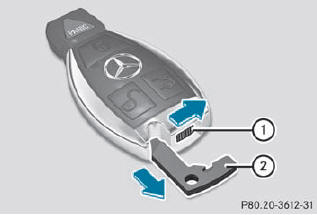
•► Push release catch 1 in the direction of the arrow and at the same time, remove mechanical key 2 from the SmartKey.
See also:
Menu overview
The number of menus shown depends on the optional equipment in the vehicle.
1. Trip menu
2. Navi menu (navigation instructions)
3. Audio menu
4. Tel menu (telephone)
5. DriveAssist. ...
Overview
The latest-generation Mercedes-Benz R-Class shows a new self-confidence. Its
entire appearance is noticeably more attractive, underlining the unique
character of this multi-talented vehicle. The f ...
Driving with summer tires
Observe the notes in the "Winter operation"
section. ...