
Panic alarm
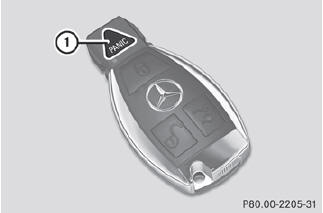
•► To activate: press  button 1 for at
least one second.
button 1 for at
least one second.
An alarm sounds and the exterior lighting flashes.
•► To deactivate: press  button 1
again.
button 1
again.
or
•► Insert the SmartKey into the ignition lock.
or
•► Press the KEYLESS-GO Start/Stop button.
The KEYLESS-GO key must be in the
vehicle.
USA only:
This device complies with Part 15 of the
FCC Rules. Operation is subject to the
following two conditions:
1. This device may not cause harmful interference, and 2. this device must accept any interference received, including interference that may cause undesired operation.
Any unauthorized modification to this device could void the user's authority to operate the equipment.
The product label with FCC ID and IC certification number can be found in the battery case of the SmartKey.
Canada only:
This device complies with RSS-Gen of
Industry Canada. Operation is subject to
the following two conditions:
1. This device may not cause interference, and 2. this device must accept any interference received, including interference that may cause undesired operation.
Any unauthorized modification to this device could void the user's authority to operate the equipment.
The product label with FCC ID and IC certification number can be found in the battery case of the SmartKey.
See also:
Engine oil
Notes on the oil level
Depending on the driving style, the vehicle
consumes up to 0.9 US qts. (0.8 l) of oil over
a distance of 600 miles (1000 km). The oil
consumption may be higher than this ...
Assigning a point of interest category
Introduction
The categories and points of interest
available depend on the distance from the
vehicle position you have set for the point of
interest.
• point of interest in the vicinity of the ...
Problems with the transmission
Problem
Possible causes/consequences and - Solutions
The transmission has
problems shifting gear.
The transmission is losing oil.
•► Have the transmission checked at ...