
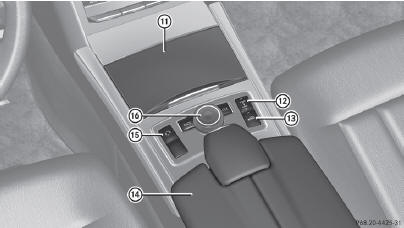
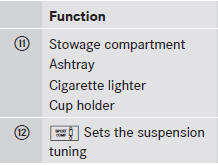
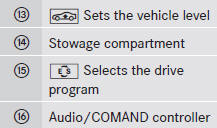
Center console, lower section
See also:
Adding engine oil
WARNING
If engine oil comes into contact with hot
engine parts, it may ignite and you could burn
yourself. Do not spill any engine oil on hot
engine parts.
Environmental note
When adding oil ...
Mounting a new wheel
WARNING
Always replace wheel bolts that are damaged
or rusted.
Never apply oil or grease to wheel bolts.
Damaged wheel hub threads should be
repaired immediately. Do not continue to
drive un ...
Extending/retracting the rear window
blind
Make sure that the rear window blind can
move freely. Otherwise, the blind or other
objects could be damaged.
The rear window blind is deactivated at
temperatures below -20 °C.
To extend/ ...