
Fuse box in the engine compartment
 Make sure that the windshield wipers are
turned off.
Make sure that the windshield wipers are
turned off.
WARNING
Make sure that the windshield wipers are
switched off and that the SmartKey is
removed from the ignition lock before you
open the cover of the fuse box. Otherwise, the
windshield wipers and the wiper rods above
the cover could be set in motion. This could
lead to you or others being injured by the
wiper rods.
Open the hood.
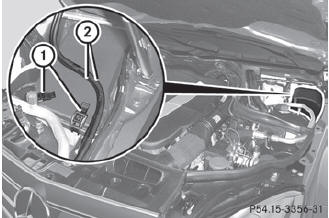
Remove any existing moisture from the
fuse box using a dry cloth.
Take lines 2 from the guides.
To open: open clamps 1.
Remove the fuse box cover forwards.
 Make sure that no moisture can
enter the
fuse box when the cover is open.
Make sure that no moisture can
enter the
fuse box when the cover is open.
To close: check whether the rubber seal is
lying correctly in the cover.
Insert the cover at the rear of the fuse box
into the retainer.
Fold down the cover and close clamps 1.
Secure lines 2 in the guides.
The cover must be seated
properly,
otherwise moisture or dirt could impair the
function of the fuses.
Close the hood.
See also:
Search & Send
Points to observe before use
To use Search & Send, your vehicle must
be equipped with mbrace and a navigation
system. You must also have an mbrace
service subscription.
"Search & ...
M+S tires
At temperatures below 45 °F(+7 °C), use
winter tires or all-season tires. Both types of
tire are identified by the M+S marking.
Only winter tires bearing the
snowflake
symbol in addition to t ...
Interchanging the wheels
WARNING
Rotate front and rear wheels only if the tires
are of the same dimension.
If your vehicle is equipped with mixed-size
tires (different tire dimensions front vs. rear),
tire rotatio ...