
Dashboard fuse box
 Do not use a pointed object such
as a
screwdriver to open the cover in the dashboard. You could damage the
dashboard or the cover.
Do not use a pointed object such
as a
screwdriver to open the cover in the dashboard. You could damage the
dashboard or the cover.
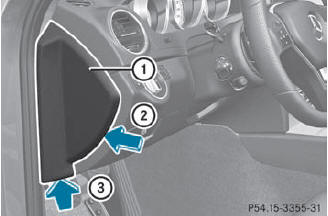
 To open: pull out cover 1 slightly at the
bottom in the direction of arrow 3.
To open: pull out cover 1 slightly at the
bottom in the direction of arrow 3.
Pull cover 1 outwards in the direction of
arrow 2 and remove it.
To close: clip in cover 1 on the front of
the dashboard.
Fold cover 1 inwards until it engages.
See also:
Activating RACE START
•► Depress the brake pedal with your left foot,
and keep it depressed.
•► Turn the drive program selector clockwise until the RS lamp lights up.
The multifunction display shows the RAC ...
Using KEYLESS-GO to start the engine
WARNING
As long as the SmartKey is in your vehicle, the
vehicle can be started. Therefore, never leave
children unattended in the vehicle, as they
could otherwise accidentally start the engin ...
Override feature for the rear side windows
WARNING
When children ride on the vehicle's rear seats,
activate the override switch. Otherwise, the
children could be injured, e.g. by trapping
themselves in the rear side window.
For the r ...