
Cigarette lighter
WARNING
When leaving the vehicle, always remove the
SmartKey from the ignition lock. Always take
the SmartKey with you and lock the vehicle.
Do not leave children unattended in the
vehicle, even if they are secured in a child
restraint system, or with access to an
unlocked vehicle. A child's unsupervised
access to a vehicle could result in an accident
and/or serious personal injury. The children
could:
• injure themselves on parts of the vehicle
• be seriously or fatally injured through
excessive exposure to extreme heat or cold
• injure themselves or cause an accident with
vehicle equipment that can be operated
even if the SmartKey is removed from the
ignition lock or removed from the vehicle,
such as seat adjustment, steering wheel
adjustment, or the memory function
If children open a door, they could injure other
persons or get out of the vehicle and injure
themselves or be injured by following traffic.
Do not expose the child restraint system to
direct sunlight. The child restraint system's
metal parts, for example, could become very
hot, and the child could be burned on these
parts.
WARNING
Never touch the heating element or sides of
the lighter; they are extremely hot. Hold the
knob only.
Make sure any children traveling with you do
not injure themselves or start a fire with the
hot cigarette lighter.
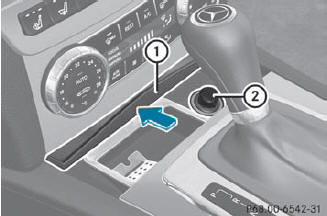
 Turn the SmartKey to position 2
in the
ignition lock.
Turn the SmartKey to position 2
in the
ignition lock.
To open: slide cover 1
forwards until it
engages.
Press in cigarette lighter 2.
Cigarette lighter 2 will pop out
automatically when the heating element is
red-hot.
To close: press cover 1
briefly at the
front.
The cover moves back.
See also:
Important safety notes
See the "Important safety notes"
section.
If ESP® detects that the vehicle is deviating
from the direction desired by the driver, one
or more wheels are braked to stabilize the
veh ...
Proper use
WARNING
There are various warning stickers affixed to
your vehicle. Their purpose is to alert you and
others to various dangers. Therefore, do not
remove any warning stickers unless the
sti ...
Child-proof locks for the rear doors
WARNING
Children could open a rear door from inside
the vehicle. This could result in serious
injuries or an accident. Therefore, when children ride in the rear always secure
the rear
doo ...