
Warning and display messages in the multifunction display
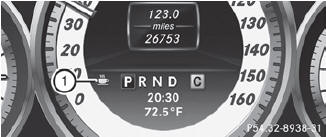
 Activate ATTENTION ASSIST using
the onboard
computer.
Activate ATTENTION ASSIST using
the onboard
computer.
Symbol 1 appears in the multifunction
display.
If ATTENTION ASSIST is active, you will be warned no sooner than 20 minutes after your journey has begun. You will then hear an intermittent warning tone twice, and the Attention Assist: Drowsiness Detected message appears in the multifunction display.
If necessary, take a break.
Press
 to confirm the message.
On long journeys, take regular breaks in good time to allow yourself to rest properly. If you do not take a break and ATTENTION ASSIST still detects typical indicators of fatigue or increasing lapses in concentration, you will be warned again after 15 minutes at the earliest.
ATTENTION ASSIST is reset when you
continue your journey and starts assessing
your tiredness again if:
• you switch off the engine.
• you take off your seat belt and open the
driver's door, e.g. for a change of drivers or
to take a break.
See also:
Turn signals
1 High-beam headlamps
2 Right turn signal
3 High-beam flasher
4 Left turn signal
► To indicate briefly: press the
combination
switch briefly to the pressure point in the
direction of a ...
Displaying the range and current fuel
consumption
•► Press the button on the
steering wheel to select the Trip menu.
•► Press the button to select
current fuel consumption21 and
approximate range.
The approximate range that ca ...
Important safety notes
In addition to the illumination provided by the
normal headlamps, Night View Assist Plus
uses infrared light to illuminate the road. The
Night View Assist Plus camera picks up the
infrared lig ...