
Cruise control lever
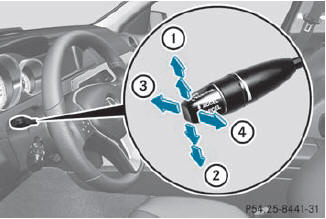
Cruise control lever
1 To switch on or to increase the speed
2 To switch on or to reduce the speed
3 To deactivate cruise control
4 To switch on with the current speed or with the last stored speed
When you activate cruise control, the stored speed is shown in the multifunction display for five seconds. In the multifunction display, the segments between the stored speed and the maximum speed light up.
See also:
Closing
WARNING
To prevent possible personal injury, always
keep hands and fingers away from the cargo
compartment opening when closing the
tailgate. Be especially careful when small
children are ar ...
Introduction to destination entry
WARNING
For safety reasons, only enter a new
destination when the vehicle is stationary.
You could otherwise be distracted from the
traffic conditions, cause an accident and
injure yoursel ...
Important safety notes
Have the batteries changed at a qualified
specialist workshop.
WARNING
Batteries contain toxic substances.
Swallowing batteries can lead to serious
health issues or death.
Keep batteries out ...