
3-zone automatic climate control
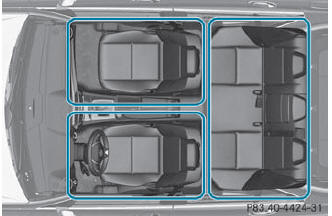
Automatic climate control climate zones
You can select different temperature settings for the driver's and front-passenger sides as well as for the rear compartment.
 Turn the SmartKey to position
2 in the ignition lock.
Turn the SmartKey to position
2 in the ignition lock.
To increase/reduce the
temperature in
the front: turn controls 1 and 6
clockwise or counter-clockwise.
Only change the temperature setting in
small increments. Start at 72 °F (22 °C).
To increase/reduce the
temperature in
the rear compartment using the front
control panel: press the  button.
The indicator lamp in the  button
goes
out.
button
goes
out.
Turn control 1 clockwise or
counterclockwise. Only change the temperature setting in small increments. Start
at 72 °F (22 °C).
To increase/reduce the
temperature in
the rear compartment using the rear
control panel: press the  or
or
 button on the rear control panel.
Only change the temperature setting in
small increments. Start at 72 °F (22 °C).
 If you leave the vehicle parked
for longer
than 30 minutes, the temperature setting
for the rear compartment then switches
back to 22 °F.
If you leave the vehicle parked
for longer
than 30 minutes, the temperature setting
for the rear compartment then switches
back to 22 °F.
See also:
Vehicle tool kit
The vehicle tool kit can be found in the
stowage well under the trunk floor/cargo
compartment floor. Depending on the vehicle
equipment, the vehicle tool kit is on the lefthand
side or the rig ...
Position of the steering wheel when the EASY-ENTRY/EXIT feature is active
The steering wheel swings upwards when you:
remove the SmartKey from the ignition lock
open the driver's door and KEYLESS-GO is in position 1
open the driver's door and the SmartKey is ...
Storing the current speed or calling up the last stored speed
WARNING
The set speed stored in memory should only
be set again if prevailing road conditions and
legal speed limits permit. Possible
acceleration or deceleration differences
arising from r ...