
Instruction labels for tires and loads
 WARNING
Do not overload the tires by exceeding the
specified load limit as indicated on the Tire
and Loading Information placard on the
driver's door B-pillar. Overloading the tires
can overheat them, possibly causing a
blowout. Overloading the tires can also result
in handling or steering problems, or brake
failure.
Two instruction labels on your vehicle show the maximum possible load.
(1) The Tire and Loading Information placard on the B-pillar on the driver's side. The Tire and Loading Information placard shows the maximum permissible number of occupants and the maximum permissible vehicle load. It also contains details of the tire sizes and corresponding pressures for tires mounted at the factory.
(2) The vehicle identification plate is on the B-pillar on the driver's side. The vehicle identification plate informs you of the gross vehicle weight rating. It is made up of the vehicle weight, all vehicle occupants, the fuel and the cargo. You can also find information about the maximum gross axle weight rating on the front and rear axle.
The maximum gross axle weight rating is the maximum weight that can be carried by one axle (front or rear axle). Never exceed the maximum load or the maximum gross axle weight rating for the front or rear axle.
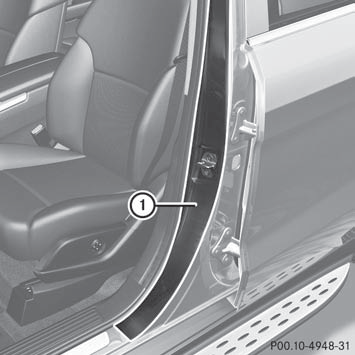
1 B-pillar, driver's side
See also:
Superlative ride comfort, outstanding handling dynamics and excellent
offroad performance
The AGILITY CONTROL suspension on which the Mercedes-Benz GLK-Class is
founded displays a high level of flexibility and resolves a conflict of aims
that particularly affects the SUV class, where c ...
Front air bags
The front air bags increase protection for the
driver's and front-passenger's head and
chest.
Driver's air bag 1 deploys in front of the
steering wheel; front-passenger front air
bag 2 depl ...
Starting procedure with the SmartKey
To start the engine using the SmartKey instead of KEYLESS-GO, pull the Start/
Stop button out of the ignition lock.
X Turn the SmartKey to position 3 in the ignition lock () and release
it as ...