
Luggage holder
The luggage holder can be used to secure light loads against the side wall of the cargo compartment to prevent them from moving around.
 Only use the luggage holder to secure
cargo with a maximum weight of 15.4 lb
(7 kg) and with dimensions that the luggage
holder can safely and securely contain.
Only use the luggage holder to secure
cargo with a maximum weight of 15.4 lb
(7 kg) and with dimensions that the luggage
holder can safely and securely contain.
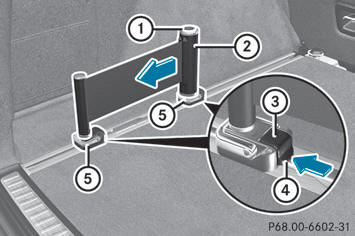
– To install: insert two brackets 5 into the
left or right loading rail.
– Press release button 1 of the luggage
holder and pull the strap out slightly.
– Insert luggage holder 2 into brackets 5
and, while doing so, press release button
3 and push the luggage holder downwards
until it engages.
– Press release button 1 of the luggage
holder and pull the strap out in the direction
of the arrow.
– Place the load between the strap and the
cargo compartment side wall.
– Using one hand, press locking button 1 of
the luggage holder.
– With your other hand, let the strap go slowly
until the load is secured.
– Make sure that locking button 4 on
brackets 5 is pressed.
This keeps brackets 5 in place on the
loading rail.
– To remove: press release button 3 on
respective bracket 5 and remove luggage
holder 2 by pulling upwards and out.
See also:
Notes on the oil level
Depending on the driving style, the vehicle
consumes up to 0.9 US qts. (0.8 l) of oil over
a distance of 600 miles (1000 km). The oil
consumption may be higher than this when
the vehicle is new or ...
Important safety notes
WARNING
Do not adjust the steering wheel while driving.
Adjusting the steering wheel while driving, or
driving without the steering wheel adjustment
feature locked could cause the driv ...
Cleaning the paintwork
Scratches, corrosive deposits, areas affected
by corrosion and damage caused by
inadequate care cannot always be completely
repaired. In such cases, visit a qualified
specialist workshop, e.g. an ...