
Removing/installing the cargo compartment cover (without integrated cargo net)
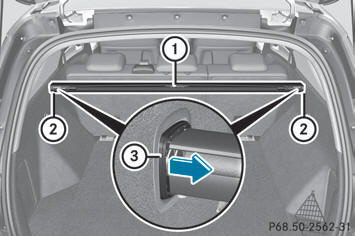
– To remove: make sure that cargo
compartment cover 1 is rolled up.
– Press in end cap 3 of cargo compartment
cover 1 on the right or left side in the
direction of the arrow and press cargo
compartment cover 1 into anchorage 2
opposite it.
– Remove cargo compartment cover 1.
– To install: set cargo compartment
cover 1 on the right or left-hand side in
anchorage 2.
– Push in opposite end cap 3 of cargo
compartment cover 1 in the direction of
the arrow and insert cargo compartment
cover 1 into opposite anchorage 2.
See also:
Jump-starting
WARNING
Failure to follow these directions will cause damage to the electronic
components, and can lead
to a battery explosion and severe injury or death.
Never lean over batteries while connec ...
Service messages
Information on the type of service and service
intervals (see separate Service Booklet).
You can obtain further information from an
authorized Mercedes-Benz Center or at
http://www.mbusa.com (U ...
EBD (electronic brake force distribution)
Observe the "Important safety notes"
section.
EBD monitors and controls the brake
pressure on the rear wheels to improve
driving stability while braking.
WARNING
If EBD has malfu ...