
Locking and unlocking centrally
The SmartKey centrally locks/unlocks:
• the doors
• the trunk lid
• the fuel filler flap
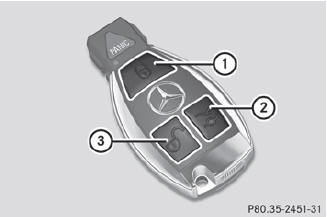
1  Locks the vehicle
2  Unlocks the trunk lid
3  Unlocks the vehicle
When unlocking, the turn signals flash once.
When locking, they flash three times.
When it is dark, the surround lighting also comes on if it is activated in the on-board computer.
If you activate the acoustic locking
confirmation function, you will hear the
following, depending on the date of
production of the vehicle:
• an acoustic signal when locking
or
• one acoustic signal when unlocking and three when locking.
The audible signal can be activated and deactivated using the on-board computer.
 To unlock centrally:
press the
button.
To unlock centrally:
press the
button.
If you do not open the vehicle within approximately 40 seconds of
unlocking:
• the vehicle is locked again.
• the theft deterrent locking system is armed again.
To lock centrally: press
the button.
See also:
Vehicles with a TIREFIT kit
– Lift the trunk floor up.
1 Lug wrench
2 Jack
3 Tire sealant filler bottle
4 Alignment bolt
5 Tire inflation compressor
6 Folding wheel chock
7 Warning triangle
8 Ratchet wrench
9 Towing ...
Side impact air bags
WARNING
The pressure sensors for side impact air bag
control are located in the doors. Do not modify any components of the doors or
door
trim panels including, for example, the
addit ...
Automatic transmission
Shift the transmission to
position P. The transmission position display in the
multifunction display shows P.
You can also start the engine
when the
transmission is in position N. ...