
ATA (Anti-Theft Alarm system)
A visual and audible alarm is triggered if the
alarm system is armed and you open:
• a door
• the vehicle with the mechanical key
• the trunk lid
• the hood
The alarm is not switched off, even if you close the open door that has triggered it, for example.
 If the alarm stays on for more
than 30
seconds, the emergency call system
mbrace (USA only) or TELE AID (Canada
only) initiates a call to the Customer
Assistance Center automatically. The
emergency call system initiates the call
provided that:
If the alarm stays on for more
than 30
seconds, the emergency call system
mbrace (USA only) or TELE AID (Canada
only) initiates a call to the Customer
Assistance Center automatically. The
emergency call system initiates the call
provided that:
• you have subscribed to the mbrace/TELE AID service.
• the mbrace/TELE AID service has been activated properly.
• the required mobile phone, power supply and GPS are available.
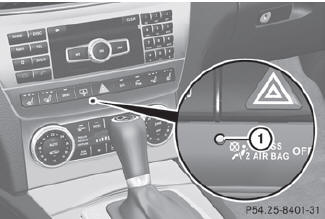
 To arm: lock the vehicle
with the SmartKey or KEYLESS-GO.
To arm: lock the vehicle
with the SmartKey or KEYLESS-GO.
Indicator lamp 1 flashes. The alarm system is armed after approximately 15
seconds.
To deactivate: unlock the
vehicle with the SmartKey or KEYLESS-GO.
To stop the alarm using the
SmartKey:
insert the SmartKey into the ignition lock. The alarm is switched off.
or
Press the
 or
or
 button on the SmartKey.
The alarm is switched off.
To stop the alarm using
KEYLESS-GO:
grasp the outside door handle. The SmartKey must be outside the vehicle.
The alarm is switched off.
or
Press the Start/Stop button on
the dashboard. The SmartKey must be inside the vehicle.
The alarm is switched off.
See also:
Occupant distribution
The distribution of occupants in a vehicle at
their designated seating positions. ...
Adjusting the lumbar support
Vehicles without the memory function: You can adjust the contour of the front
seats so as to provide optimum support for your back.
Move adjustment lever 1 in the direction of the arrow until the ...
Important safety notes
WARNING
To help avoid personal injury during a collision
or sudden maneuver, exercise care when
storing objects in the vehicle. Put luggage or
cargo in the cargo compartment if possible.
Do n ...