
Transmission position display
The current transmission position is shown in the multifunction display.
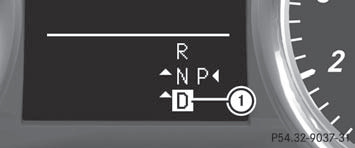
1 Transmission position
The arrows in the transmission position display show how and into which transmission positions you can change using the DIRECT SELECT lever.
 If the transmission position display in the
multifunction display is not working, you
should pull away carefully to check whether
the desired transmission position is
engaged. Select transmission position D.
If the transmission position display in the
multifunction display is not working, you
should pull away carefully to check whether
the desired transmission position is
engaged. Select transmission position D.
Do not restrict the shift range.
See also:
Important safety notes
We recommend that all infants and children
be properly secured in an infant or child
restraint system at all times while the vehicle
is in motion.
The use of seat belts and infant and child
r ...
Safety systems
Problem
Possible causes/consequences and
Solutions
(USA only)
(Canada only)
The red brake system warning lamp comes on while the
engine is running. A warning to ...
Rear-view mirror
Rear-view mirror (manual anti-glare)
•► anti-glare mode: flick anti-glare
switch 1 forwards or back. ...