
Control panel for 3-zone automatic climate control
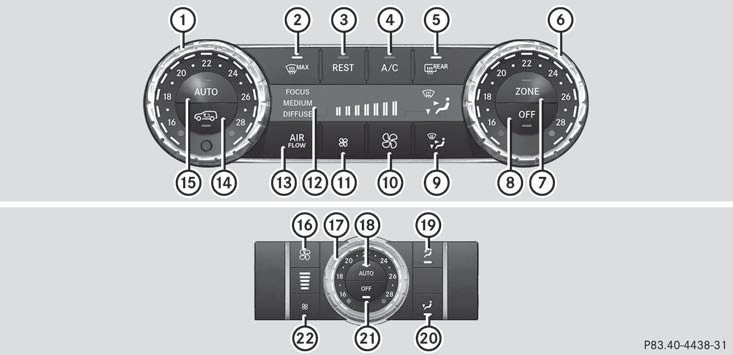
Canada only
1 Sets the temperature, left
2 Defrosts the windshield
3 Activates/deactivates the residual heat function
4 Activates/deactivates cooling with air dehumidification
5 Switches the rear window defroster on/off
6 Sets the temperature, right
7 Switches the ZONE function on/off
8 Switches climate control on/off
9 Sets the air distribution
10 Increases the airflow
11 Reduces the airflow
12 Display
13 Adjusts the climate control settings (AIR FLOW)
14 Activates/deactivates air-recirculation mode
15 Sets climate control to automatic
Rear control panel
16 Increases the airflow
17 Sets the temperature
18 Sets the rear-compartment climate control to automatic
19 Directs the airflow through the rear air vents
20 Directs the airflow through the footwell vents
21 Switches rear-compartment climate control on/off
22 Reduces the airflow
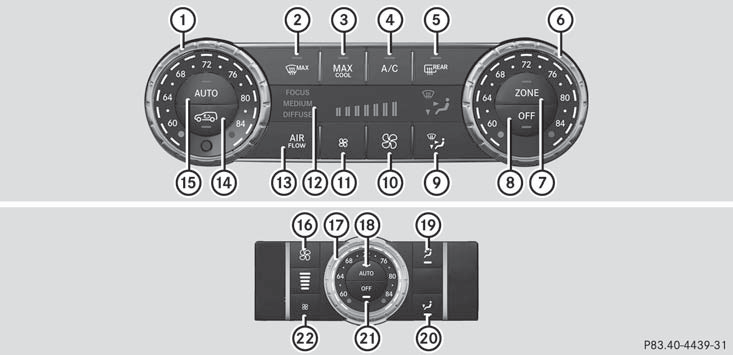
USA only
1 Sets the temperature, left
2 Defrosts the windshield
3 Switches maximum cooling MAX COOL on/off
4 Activates/deactivates cooling with air dehumidification
5 Switches the rear window defroster on/off
6 Sets the temperature, right
7 Switches the ZONE function on/off
8 Switches climate control on/off
9 Sets the air distribution
10 Increases the airflow
11 Reduces the airflow
12 Display
13 Adjusts the climate control settings (AIR FLOW)
14 Activates/deactivates air-recirculation mode
15 Sets climate control to automatic
Rear control panel
16 Increases the airflow
17 Sets the temperature
18 Sets the rear-compartment climate control to automatic
19 Directs the airflow through the rear air vents
20 Directs the airflow through the footwell vents
21 Switches rear-compartment climate control on/off
22 Reduces the airflow
See also:
SmartKey
0 To remove the SmartKey (shift the transmission to position P)
1 Power supply for some consumers, such as the windshield wipers
2 Ignition (power supply for all consumers) and drive position
3 T ...
Adjusting the headlamps
1 V vertical axis
2 H (horizontal) height, measured from the
center
Setting the headlamps correctly is extremely
important. Setting the high-beam headlamps
also sets the low-beam headlamps. (Th ...
Limited braking performance on salttreated
roads
WARNING
The layer of salt on the brake discs and the
brake pads/linings may cause a delay in the
braking effect, resulting in a significantly
longer braking distance, which could lead to
an ...