
Operation
Depending on the date of manufacture of your
vehicle, the  or
or
 symbol for the
automatic headlamp mode/daytime running
lamps is located on the light switch.
symbol for the
automatic headlamp mode/daytime running
lamps is located on the light switch.
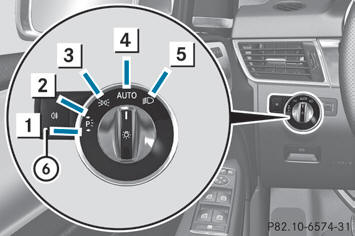
Illustration: light switch with the
symbol for
the automatic headlamp mode/daytime running
lamps
 Left-hand standing lamps
 Right-hand standing lamps
 Parking lamps, license plate and
instrument cluster lighting
Parking lamps, license plate and
instrument cluster lighting
 Automatic headlamp mode/daytime
running lamps
Automatic headlamp mode/daytime
running lamps
 Low-beam/high-beam headlamps
 Rear fog lamp
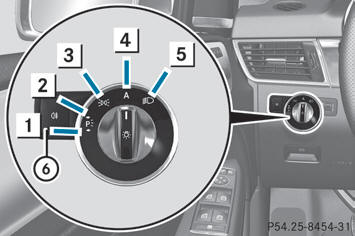
Illustration: light switch with the
symbol for
the automatic headlamp mode/daytime running
lamps
Left-hand standing lamps
Right-hand standing lamps
Parking lamps, license plate and
instrument cluster lighting
 Automatic headlamp mode/daytime
running lamps
Automatic headlamp mode/daytime
running lamps
Low-beam/high-beam headlamps
Rear fog lamp
The turn signals, high-beam headlamps and the high-beam flasher are operated using the combination switch.
 If the battery has been excessively
discharged, the parking lamps or standing
lamps are automatically switched off to
enable the next engine start. Always park
your vehicle safely and sufficiently lit
according to legal standards. Avoid the
continuous use of the
If the battery has been excessively
discharged, the parking lamps or standing
lamps are automatically switched off to
enable the next engine start. Always park
your vehicle safely and sufficiently lit
according to legal standards. Avoid the
continuous use of the  parking lamps
for several hours. If possible, switch on the
parking lamps
for several hours. If possible, switch on the
 right or the
 left standing lamp.
The exterior lighting (except the parking/
standing lamps) switches off automatically if
you:
- remove the SmartKey from the ignition lock
- open the driver's door with the SmartKey
in position 0
If you hear a warning tone when you leave the vehicle, the lights may still be switched on.
- Turn the light switch to or
.
See also:
Please bear the following in mind
At the onset of winter, have your vehicle
winterproofed at a qualified specialist
workshop, e.g. at an authorized Mercedes-
Benz Center.
Observe the notes in the "Changing a wheel"
se ...
Adjusting the steering wheel electrically
Adjusting the steering wheel electrically
1 To adjust the steering wheel height
2 To adjust the steering wheel position (fore-and-aft adjustment)
Other topics:
• EASY-ENTRY/EXIT feature
• stor ...
Nuts & Bolts
Overall reliability for the current C-Class has been average. In crash tests
by the Insurance Institute for Highway Safety, the car earned the top score of
Good in front, side, rear and roof-crush ...