
Adjusting the head restraints manually
Adjusting the head restraint height
 The head restraints must only
be removed
at a qualified specialist workshop.
The head restraints must only
be removed
at a qualified specialist workshop.
Mercedes-Benz recommends that you use
a Mercedes-Benz Center for this purpose.
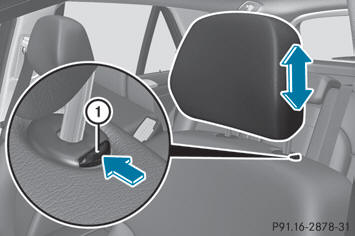
- To raise: pull the head restraint up to the
desired position.
- To lower: press release catch 1 in the
direction of the arrow and push the head
restraint down to the desired position.
Adjusting the fore/aft position of the head restraint
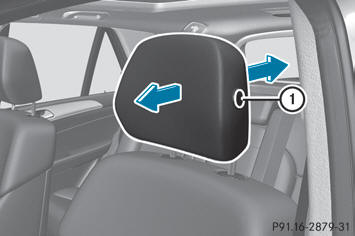
With this function you can adjust the distance between the head restraint and the back of the seat occupant's head.
- To adjust forwards: pull the head restraint
forwards in the direction of the arrow until
it engages.
There are several notches.
- To adjust rearwards: press and hold the
release button 1 and push the head
restraint back.
- When the head restraint is in the desired
position, release the button and make sure
that the head restraint is engaged in
position.
See also:
DOT, Tire Identification Number (TIN)
U.S. tire regulations prescribe that every
manufacturer of new tires or retreader has to
imprint a TIN in or on the sidewall of each tire
produced.
The TIN is a unique identification number. ...
Limited Warranty
Follow the instructions in this
manual
about the proper operation of your vehicle
as well as about possible vehicle damage.
Damage to your vehicle that arises from
culpable contraventions ag ...
Vehicle level
Important safety notes
Your vehicle regulates its height
automatically. All-round self-leveling ensures
the best possible suspension and constant
ground clearance, even with a laden vehicle.
W ...