
Opening and closing
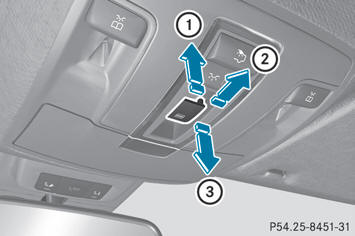
Overhead control panel
1 To raise
2 To open
3 To close
- Turn the SmartKey to position 1 or 2 in the
ignition lock.
- Press or pull the
 switch in the
corresponding direction.
switch in the
corresponding direction.
 If you press the
switch beyond the
point of resistance, an automatic opening/closing process is started in the
corresponding direction. You can stop
automatic operation by operating the
switch again.
If you press the
switch beyond the
point of resistance, an automatic opening/closing process is started in the
corresponding direction. You can stop
automatic operation by operating the
switch again.
See also:
Important safety notes
When loading the vehicle, make sure that
you do not stack the load in the cargo
compartment higher than the lower edge of
the side windows. Do not place heavy
objects on top of the cargo ...
Using the phone book and address book
The COMAND phone book is an extract of
those entries from the address book which
contain at least one telephone number.
The address book organizes and stores
entries that are entered from diffe ...
Uniform Tire Quality Grading Standards
A uniform standard to grade the quality of
tires with regards to tread quality, tire traction
and temperature characteristics. Ratings are
determined by tire manufacturers using U.S. government ...