
Opening/closing automatically from inside
 WARNING
Maintain sight of the area around the rear of
the vehicle while operating the tailgate with
the door-mounted remote tailgate switch.
Monitor the opening procedure carefully to
make sure no one is in danger of being
injured.
To interrupt the opening procedure, press or
pull the door-mounted remote tailgate switch.
When the SmartKey is not inserted in the
starter switch (vehicles with KEYLESS-GO: Make sure the vehicle's on-board
electronics
have status 0): Press button
 on the
SmartKey.
on the
SmartKey.
WARNING
Maintain sight of the area around the rear of
the vehicle while operating the tailgate with
the door-mounted remote tailgate switch.
Monitor the closing procedure carefully to
make sure no one is in danger of being
injured.
To interrupt the closing procedure, press or
pull the door-mounted remote tailgate switch.
WARNING
To prevent possible personal injury, always
keep hands and fingers away from the cargo
compartment opening when closing the
tailgate. Be especially careful when small
children are around.
WARNING
Make sure the tailgate is closed when the
engine is running and while driving. Among
other dangers, deadly carbon monoxide (CO)
gases may enter vehicle interior resulting in
unconsciousness and death.
You can open and close the tailgate from the driver's seat when the vehicle is stationary and unlocked.
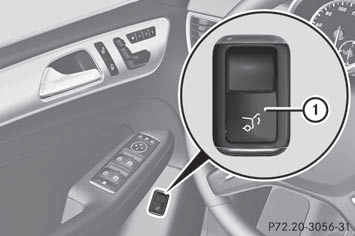
- To open: pull remote operating switch 1
for the tailgate until the tailgate opens.
- To close: turn the SmartKey to position 1
or 2 in the ignition lock.
- Press remote operating switch for
tailgate 1 until the tailgate is closed.
If the tailgate comes into contact with an object, the closing procedure is interrupted and the tailgate reopens.
- To interrupt the closing procedure: push or pull remote operating switch for the tailgate 1.
See also:
Extending/retracting the rear window
blind
Make sure that the rear window blind can
move freely. Otherwise, the blind or other
objects could be damaged.
The rear window blind is deactivated at
temperatures below -20 °C.
To extend/ ...
Overview of occupant safety
important facts about the restraint system components of the vehicle.
The restraint system consists of:
seat belts
child restraint systems
LATCH-type (ISOFIX) child seat anchors
Additional ...
Glare from the side
Fold down the sun visor.
Pull the sun visor out of retainer 2.
Swing the sun visor to the side. ...