
Fastening seat belts
 WARNING
According to accident statistics, children are
safer when properly restrained on the rear
seats than on the front-passenger seat. Thus,
we strongly recommend that children be
placed in the rear seat whenever possible.
Regardless of seating position, children 12
years old and under must be seated and
properly secured in an appropriately sized
child restraint system or booster seat
recommended for the size and weight of the
child. For additional information, see the
"Children in the vehicle" section.
A child's risk of serious or fatal injuries is
significantly increased if the child restraints
are not properly secured in the vehicle and/or the child is not properly secured
in the child
restraint.
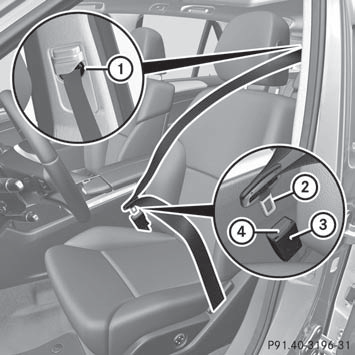
- Adjust the seat and move the backrest to
an almost vertical position.
- Pull the seat belt smoothly through belt
sash guide 1.
- Without twisting it, guide the shoulder
section of the seat belt across the middle
of your shoulder and the lap section across
your hips.
- Engage belt tongue 2 in buckle 3.
Seat-belt adjustment: if necessary, the
driver's and front-passenger seat belts
automatically adjust to the upper body.
- If necessary, adjust the seat belt to the
appropriate height.
- If necessary, pull upwards on the shoulder
section of the seat belt to tighten the belt
across your body.
All seat belts except the driver's seat belt are equipped with a special seat belt retractor to securely fasten child restraint systems in the vehicle. For further information on special seat belt retractors.
For more information about releasing the seat belt with release button 4, see "Releasing seat belts".
See also:
Symbols
Registered trademarks:
• BabySmart™ is a registered trademark of
the Siemens Automotive Corp.
• Bluetooth® is a registered trademark of the
Bluetooth SIG Inc.
• DTS is a registered tradem ...
Calling up memory space info
Select Music Register by sliding
and
turning
the COMAND controller and
press to confirm.
Select Memory Information and press
to confirm.
The following is displayed:
• storage capaci ...
Displays and controls
1 Speedometer with
segments
2 Adjusts the instrument
cluster lighting: dimmer
3 Reset button
4 Adjusts the instrument
cluster lighting: brighter
5 Tachometer
6 Fuel gauge
7 Multifunction ...