
TIREFIT kit version 2
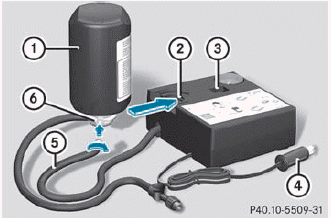
► Pull connector 4 with the cable and
hose
5 out of the housing.
► Screw hose 5 onto flange 6 of tire
sealant bottle 1.
► Insert tire sealant bottle 1 head
downwards into recess 2 of the tire
inflation compressor.
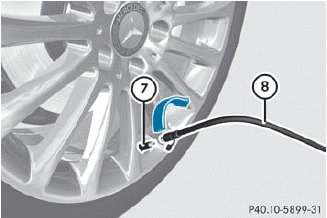
► Remove the cap from valve C on the
faulty
tire.
► Screw filler hose D onto valve C.
► Insert connector ? into the socket in the
footwell of the second row of seats.
 None of the other sockets or cigarette
lighters are designed for operating the tire
inflation compressor.
None of the other sockets or cigarette
lighters are designed for operating the tire
inflation compressor.
► Turn the SmartKey to position
1 in the ignition lock.
► Press on/off switch = on the tire
inflation
compressor to I.
The tire inflation compressor is switched on. The tire is inflated.
 First, TIREFIT is pumped into the tire. The
pressure can briefly rise to approximately
500 kPa (5 bar/73 psi).
First, TIREFIT is pumped into the tire. The
pressure can briefly rise to approximately
500 kPa (5 bar/73 psi).
Do not switch off the tire inflation compressor during this phase.
► Allow the tire inflation compressor to run for five minutes. The tire should then have attained a pressure of at least 180 kPa (1.8 bar/26 psi).
Do not operate the tire inflation
compressor for longer than eight minutes
at a time without a break. It may otherwise
overheat.
The tire inflation compressor can be operated again once it has cooled down.
If a pressure of 180 kPa (1.8 bar/26 psi) has been achieved after five minutes, see.
If a pressure of 180 kPa (1.8 bar/26 psi) has not been achieved after five minutes, see.
See also:
Important safety notes
WARNING
Severe conditions (e.g. strong air pollution)
may require replacement of the filter before
its scheduled replacement interval. A clogged
filter will reduce the air volume to the int ...
Opening
Switch off the engine.
emove the SmartKey from the ignition lock.
KEYLESS-GO: open the driver’s door. This switches the ignition to position 0,
which corresponds to having removed the SmartK ...
Storing wheels
Store wheels that are not being used in a cool,
dry and preferably dark place. Protect the
tires from oil, grease, gasoline and diesel. ...