
MB Info call button
► Open the stowage compartment under the armrest.
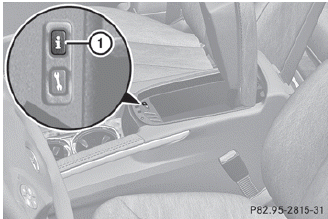
► Press and hold MB Info call button 1 for more than two seconds.
This initiates a call to the Mercedes-Benz Customer Assistance Center. The indicator lamp in MB Info call button 1 flashes while the connection is being established. The Connecting Call message appears in the multifunction display. The audio output is muted.
If a connection can be established, the Call Connected message appears in the multifunction display.
If a cellular phone network is available and there is sufficient GPS reception, the mbrace system transmits data to the Mercedes-Benz Customer Assistance Center, for example:
• current location of the vehicle
• vehicle identification number
 The COMAND display shows that an
mbrace call is active. During the call, you
can change to the navigation menu by
pressing the NAV button on COMAND, for
example.
The COMAND display shows that an
mbrace call is active. During the call, you
can change to the navigation menu by
pressing the NAV button on COMAND, for
example.
Voice output is not available.
A voice connection is established between the Mercedes-Benz Customer Assistance Center and the vehicle occupants. You can obtain information on how to operate your vehicle's systems, on the location of the nearest authorized Mercedes-Benz Center, and on further products and services offered by Mercedes-Benz USA.
Further details on the mbrace system can be found under http://www.mbusa.com34.
Log in under "Owners Online".
The mbrace system failed to initiate an
MB Info call if:
• the indicator lamp in MB Info call
button : is flashing continuously.
• no voice connection to the Mercedes-Benz
Customer Assistance Center was
established.
This may be because the corresponding mobile phone network is not available.
The Call Failed message appears in the multifunction display.
► To end a call: press the
 button on the
multifunction steering wheel.
button on the
multifunction steering wheel.
or
► Press the corresponding button for ending
a phone call on COMAND.
See also:
Shift ranges
Introduction
When the automatic transmission is in
position D, it is possible to restrict or
derestrict the shift range.
The shift range selected is shown in the
multifunction display. The aut ...
Maximum permissible gross vehicle weight rating
The specifications shown on the Tire and Loading Information placard in the
illustration are examples. The maximum permissible gross vehicle weight rating is
vehicle-specific and may differ fro ...
Temperature
WARNING
The temperature grade for this tire is
established for a tire that is properly inflated
and not overloaded. Excessive speed,
underinflation, or excessive loading, either
separatel ...