
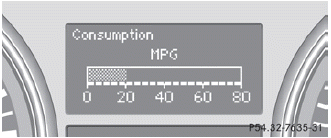
Displaying the current fuelconsumption
► Press
 on the steering wheel
to select the trip computer menu.
on the steering wheel
to select the trip computer menu.
► Press
 to select
Consumption.
to select
Consumption.
The current fuel consumption is displayed.
See also:
Important safety notes
ATTENTION ASSIST helps you during long,
monotonous journeys such as on freeways
and interstate highways. It is active in the
range between 50 mph (80 km/h) and
112 mph (180 km/h).
If ATTENTIO ...
Setting the temperature
Different temperatures can be set for the driver's and front-passenger sides.
Turn the SmartKey to position 2 in the ignition lock.
To increase/reduce: turn controls 1 and 8 clockwise or cou ...
General information
Operational readiness of the navigation
system
The navigation system must determine the
position of the vehicle before first use or
whenever operational status is restored.
Therefore, you may ...