
Multifunction display
Values and settings as well as display messages are shown in the multifunction display.
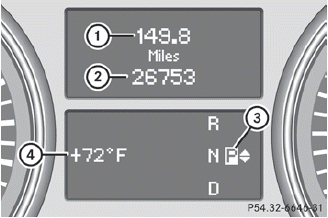
1 Trip odometer
2 Odometer
3 Transmission position
4 Status bar with outside temperature or
speed
For further information on displaying the transmission position, see.
See also:
Introduction to automatic climate
control
You can operate automatic climate control
using COMAND or the buttons on the upper
section of the center console.
Several special automatic climate control
functions can only be adjusted using ...
Important safety notes
WARNING
Make sure the trunk lid is closed when the
engine is running and while driving. Among
other dangers, deadly carbon monoxide (CO)
gases may enter the vehicle interior resulting
in un ...
Jump-starting
WARNING
Failure to follow these directions will cause damage to the electronic components,
and can lead to a battery explosion and severe injury or death.
Never lean over batteries while connectin ...