
DISTRONIC displays in thespeedometer
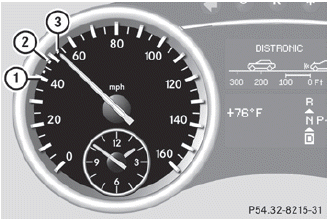
When DISTRONIC is activated, one or two segments in the set speed range light up.
 For design reasons, the speed displayed
in the speedometer may differ slightly from
the speed set for DISTRONIC.
For design reasons, the speed displayed
in the speedometer may differ slightly from
the speed set for DISTRONIC.
If DISTRONIC detects a vehicle in front, segments 2 between the speed of the vehicle in front 1 and stored speed 3 light up.
WARNING 
An intermittent warning sounds and the
distance warning lamp  in the
instrument
cluster is illuminated if the Distronic system
calculates that the distance to the vehicle
ahead and your vehicle's current speed
indicate that the Distronic will not be capable
of slowing the vehicle sufficiently to maintain
the preset following distance, which creates
a danger of a collision.
in the
instrument
cluster is illuminated if the Distronic system
calculates that the distance to the vehicle
ahead and your vehicle's current speed
indicate that the Distronic will not be capable
of slowing the vehicle sufficiently to maintain
the preset following distance, which creates
a danger of a collision.
Immediately brake the vehicle to increase
your distance to the preceding vehicle. The
warning sound is intended as a final caution
in which you should intercede with your own
braking inputs to avoid a potentially
dangerous situation. Do not wait for the
operation of the warning signal to intercede
with your own braking. This will result in
potentially dangerous emergency braking
which will not always result in an impact being
avoided.
Tailgating increases the risk of an accident.
WARNING
DISTRONIC brakes your vehicle with a
maximum deceleration of 13 ft/s2(4 m/s2).
This corresponds to approximately 40% of
your vehicle's maximum possible braking
power.
You must apply the brakes yourself to avoid a
collision. DISTRONIC brakes the vehicle to
restore the set distance to the vehicle in front
or to restore the set speed. In this case, the
brake pedal is depressed automatically,
which can be seen by a movement of the
brake pedal.
Always keep the driver's footwell clear,
including the area under the brake pedal.
Objects in this area may impair pedal
movement and cause the DISTRONIC braking
function to malfunction.
Do not place your foot under the brake pedal
– your foot could become caught.
See also:
Starting procedure with the SmartKey
To start the engine using the
SmartKey
instead of KEYLESS-GO, pull the Start/Stop button out of the ignition lock.
Turn the SmartKey to position 3
in the
ignition lock and release it as
so ...
Safety guidelines for seat belts,
Emergency Tensioning Devices (ETDs)
and air bags
WARNING
- Damaged seat belts or seat belts that have
been subjected to stress in an accident
must be replaced. Their anchoring points
must also be checked. Only use seat belts
installed o ...
Chassis in detail: Dynamism meets comfort
All models in the new M-Class range offer excellent comfort and superb
driving dynamics as standard - both on the road and away from the tarmac.
Besides the steel suspension with selective damping ...