
Driving on wet roads
Hydroplaning
If water has accumulated to a certain depth on the road surface, there is a danger of hydroplaning occurring, even if:
• you drive at low speeds.
• the tires have adequate tread depth.
For this reason, in the event of heavy rain or in conditions in which hydroplaning can occur you must drive in the following manner:
• reduce your speed
• avoid ruts
• brake carefully
Driving on flooded roads
 Do not drive through flooded areas.
Check the depth of any water before driving through it. Drive slowly through standing water. Otherwise, water may enter the vehicle interior or the engine compartment.
This can damage the electronic components in the engine or the automatic transmission. Water can also be drawn in by the engine's air suction nozzles and this can cause engine damage.
 Set the raised level before driving through
a stretch of standing water.
Set the raised level before driving through
a stretch of standing water.
Off-road fording
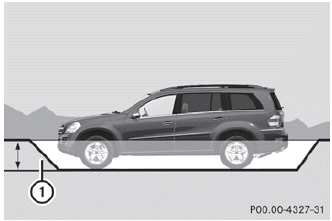
1 Fording depth
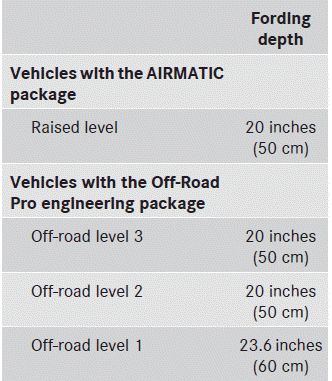
• Establish how deep the water is and the
characteristics of the body of water before
fording.
• Select the highest possible vehicle
level.
• Select the off-road drive program or the LOW RANGE off-road
gear.
• Select the off-road drive program.
• Restrict the shift range to 1 or 2.
• Avoid high engine speeds.
• Enter and exit the water at a flat place
and
at a steady walking pace.
Under no circumstances should you
accelerate before entering the water. The
bow wave could cause water to enter and
damage the engine and other assemblies.
• Drive slowly and at an even speed
through
the water.
• Do not stop.
Do not open any of the vehicle's doors
while fording. Otherwise, water could get
into the vehicle interior and damage the
vehicle's electronics and interior
equipment.
• Water offers a high degree of
resistance,
and the ground is slippery and in some
cases unstable. Therefore, it is difficult and
dangerous to pull away in the water.
• Ensure that a bow wave does not form as
you drive.
• Clean any mud from the tire tread after
fording.
• Apply the brakes to dry them after fording.
See also:
Changing the battery
You require a CR 2025 3 V cell battery.
Take the mechanical key out of the
SmartKey.
Press mechanical key 2 into the opening
in the SmartKey in the direction of the
arrow until battery tra ...
Important notes
In order to prevent the vehicle's battery from
discharging, the interior lighting functions are
automatically deactivated after some time
except for when the SmartKey is in position
2 in the i ...