
Shift ranges
Introduction
When the automatic transmission is in position D, it is possible to restrict or derestrict the shift range.
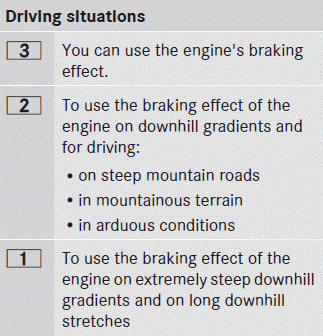
The shift range selected is shown in the multifunction display. The automatic transmission shifts only as far as the selected gear.
Restricting the shift range
► Pull the left-hand steering wheel paddle shifter.
The automatic transmission shifts down one gear and restricts the shift range to the relevant gear.
 If the engine exceeds the maximum
engine speed when shifting down, the
automatic transmission protects against
engine damage by not shifting down.
If the engine exceeds the maximum
engine speed when shifting down, the
automatic transmission protects against
engine damage by not shifting down.
If the maximum engine speed for the shift
range is reached and you continue to
accelerate, the automatic transmission
shifts up in order to prevent the engine
from overrevving, even if the shift range is
restricted.
Derestricting the shift range
► Pull the right-hand steering wheel paddle shifter.
The shift range is derestricted.
Clearing the shift range restriction
► Pull and hold the right-hand steering wheel paddle shifter until D is shown again in the multifunction display.
The automatic transmission shifts from the current shift range directly to D.
Selecting the ideal shift range
► Pull the left-hand steering wheel paddle shifter and hold it in position.
The automatic transmission shifts to the gear which allows optimum acceleration and deceleration. To do this, the automatic transmission shifts down one or more gears.
See also:
Daytime running lamps
Daytime running lamps in Canada
The daytime running lamps function is
required by law in Canada. It cannot therefore
be deactivated.
•► Turn the light switch to or
.
With the engine run ...
Locking and unlocking centrally
The SmartKey centrally locks/unlocks:
• the doors
• the tailgate
• the fuel filler flap
1 Locks the vehicle
2 Opens/closes the tailgate
3 Unlocks the vehicle
When unlocking, the turn signa ...
Notes on the oil level
Depending on the driving style, the vehicle
consumes up to 0.9 US qts. (0.8 l) of oil over
a distance of 600 miles (1000 km). The oil
consumption may be higher than this when
the vehicle is new or ...