
Transmission position display
The current transmission position is shown in the multifunction display.
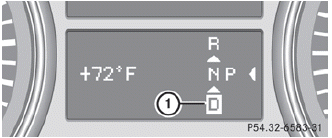
1 Transmission position
 The arrows in the transmission position
display show how and into which
transmission positions you can change
using the DIRECT SELECT lever.
The arrows in the transmission position
display show how and into which
transmission positions you can change
using the DIRECT SELECT lever.
 If the transmission position display in the
multifunction display is not working, you
should pull away carefully to check whether
the desired transmission position is
engaged. Select transmission position D.
If the transmission position display in the
multifunction display is not working, you
should pull away carefully to check whether
the desired transmission position is
engaged. Select transmission position D.
Do not restrict the shift range.
See also:
Important safety notes
WARNING
Grains of sand, particles of dirt and other
abrasive materials can enter the brake system. This can lead to excessive wear
and
unpredictable braking efficiency.
After the bra ...
ADAPTIVE BRAKE
ADAPTIVE BRAKE enhances braking safety
and offers increased braking comfort. In
addition to the braking function, ADAPTIVE
BRAKE also has the HOLD function and hill start assist. For further inf ...
Power washers
WARNING
Do not use power washers with circular-jet
nozzles (dirt grinders) to clean your vehicle, in
particular the tires. You could otherwise
damage the tires and cause an accident.
...