
Setting the center air vents
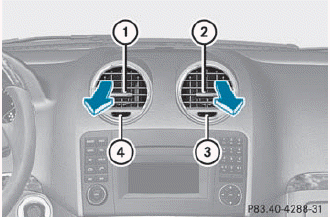
1 Center air vent, left
2 Center air vent, right
3 Center vent thumbwheel, right
4 Center vent thumbwheel, left
► To open/close: turn thumbwheels 3 and 4 to the right or left.
See also:
Premium-grade unleaded gasoline
To ensure the longevity and full
performance of the engine, only premiumgrade
unleaded gasoline must be used.
If no premium-grade unleaded gasoline is
available and regular unleaded gasoline
mu ...
Centrally locking and unlocking the vehicle from the inside
You can centrally lock or unlock the vehicle from the inside.
The central locking/unlocking button does not lock or unlock the fuel filler
flap.
You cannot unlock the vehicle centrally from the ...
Cleaning the windows
WARNING
Before cleaning the windshield or wiper blades, switch off the windshield wipers
and remove the SmartKey from the ignition lock. On vehicles with KEYLESS-GO, press
the Start/Stop but ...