
Opening and closing the side trimpanels
You must open the side trim panel in the cargo compartment before you can change the bulbs in the tail lamps.
Left-hand side trim panel
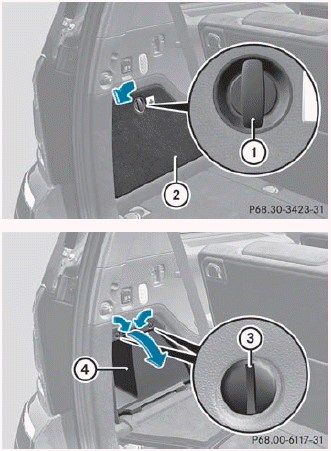
► To open: turn release knob 1 90° in the
direction of the arrow and remove side trim
panel 2.
► Insert a suitable object, e.g. a coin,
into the
slots of release knobs 3.
► Turn release knobs 3 90° in the direction
of the arrow and remove stowage
compartment 4.
► To close: insert stowage
compartment 4 and turn release
knobs 3 in the opposite direction to the
arrow until the slots on the release knobs
are in a vertical position.
► Insert side trim panel 2 and turn release knob 1 90° in the opposite direction to the arrow.
Right-hand side trim panel
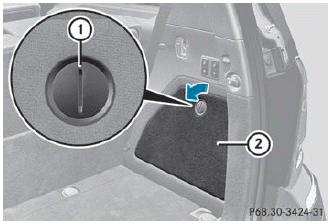
► To open: insert a suitable object, e.g.
a
coin, into the slot of release knob 1 on
side trim panel 2.
► Turn release knob 1
90° in the direction
of the arrow and remove side trim
panel 2.
► To close: insert side trim panel ; and
turn
release knob 1 90° in the opposite
direction to the arrow.
See also:
Trailer towing
When you attach a trailer, make sure you have
correctly established the electrical
connection. This can be accomplished by checking the trailer lighting. In this
event,
Blind Spot Assist is deact ...
Opening
Press the button on the SmartKey.
Pull handle 1.
Raise the tailgate.
Vehicles with the EASY-PACK tailgate: if you pull handle 1 and keep it in this
position, you can open the tailga ...
4MATIC (permanent four-wheel drive)
4MATIC ensures that all four wheels are
permanently driven. Together with ESP®, it
improves the traction of your vehicle
whenever a drive wheel spins due to
insufficient grip.
WARNING
If a ...