
Parking position for the exteriormirror on the front-passenger side
Setting and storing the parking position
You can position the front-passenger side exterior mirror in such a way that you can see the rear wheel on that side as soon as you engage reverse gear. You can store this position.
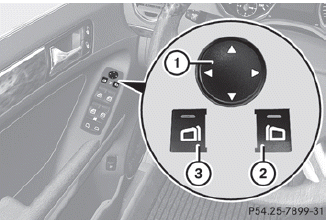
► Make sure that the vehicle is stationary and that the SmartKey is in position 2 in the ignition lock.
► Press button 2 for the exterior mirror on the front-passenger side.
► Engage reverse gear.
The exterior mirror on the front-passenger side moves to the preset parking position.
► Use adjustment button 1 to adjust the exterior mirror to a position that allows you to see the rear wheel and the curb.
The parking position is stored.
 If you shift the transmission to another
position, the exterior mirror on the frontpassenger
side returns to the driving
position.
If you shift the transmission to another
position, the exterior mirror on the frontpassenger
side returns to the driving
position.
Calling up a stored parking position setting
► Turn the SmartKey to position 2 in the ignition lock.
► Adjust the exterior mirror on the frontpassenger side with the corresponding button.
► Engage reverse gear.
The exterior mirror on the front-passenger side moves to the stored parking position.
The exterior mirror on the front-passenger side moves back to its original position:
• as soon as you exceed a speed of 6 mph
(10 km/h)
• about ten seconds after you have
disengaged reverse gear
• if you press button 3 for the exterior
mirror on the driver's side
See also:
THERMOTRONIC climate control with three individual climate modes
The second-generation Mercedes CLS can be optionally fitted with an automatic
climate control system which not only allows individual temperatures to be set
for three zones - for the driver, the f ...
Belt height adjustment
You can adjust the seat belt height on the
driver's seat and the front-passenger seat.
Adjust the height so that the upper part of the
seat belt is routed across the center of your
shoulder.
...
RACETIMER
Displaying and starting RACETIMER
WARNING
The RACETIMER feature is only for use on
roads and in conditions where high speed
driving is permitted. Racing on public roads is
prohibited under a ...