
Switching on/off
The three red indicator lamps in the button indicate the heating level you have selected.
 If the battery voltage is too low, the seat
heating may switch off.
If the battery voltage is too low, the seat
heating may switch off.
One or more of the indicator lamps in the seat heating button are flashing.
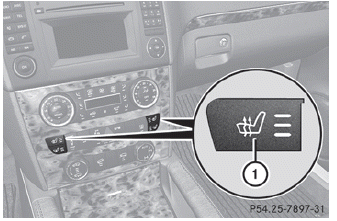
Driver's and front-passenger seat
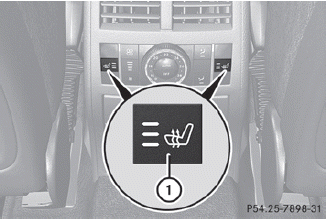
Rear seats
The system automatically switches down from level 3 to level 2 after approximately five minutes.
The system automatically switches down from level 2 to level 1 after approximately ten minutes.
The system automatically switches off approximately 20 minutes after it is set to level 1.
► Make sure that the SmartKey is in
position
2 in the ignition lock.
► To switch on: press button 1 repeatedly
until the desired heating level is set.
► To switch off: press button 1 repeatedly
until all the indicator lamps go out.
See also:
Front
Front
...
Load index
Tire data is vehicle-specific and may
deviate from the data in the example.
In addition to the load bearing index, load
index 1 may be imprinted after the letters
that identify speed r ...
Mounting dimensions
WARNING
Only have a trailer tow hitch retrofitted at a qualified specialist workshop
which has the necessary specialist knowledge and tools to carry out the work required.
Mercedes-Benz reco ...