
NECK-PRO luxury head restraints
 If you have difficulty resetting the NECKPRO
luxury head restraints, have this work
carried out at a qualified specialist
workshop, e.g. an authorized Mercedes-
Benz Center.
If you have difficulty resetting the NECKPRO
luxury head restraints, have this work
carried out at a qualified specialist
workshop, e.g. an authorized Mercedes-
Benz Center.
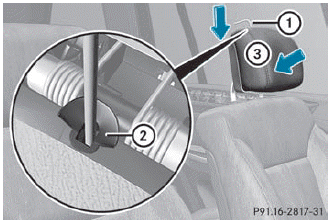
► Remove resetting tool 1 from the
vehicle
document wallet.
► Slide resetting tool 1 into guide 2
between the NECK-PRO luxury head
restraint and the rear cover of the head
restraint.
► Push resetting tool 1 downwards until you
hear the head restraint deployment
mechanism engage.
► Pull out resetting tool 1.
► Firmly press the NECK-PRO luxury head
restraint cushion back 3 until it engages.
► Repeat this procedure for the second
NECK-PRO luxury head restraint.
► Put resetting tool 1 back into the vehicle
document wallet.
See also:
Activating/deactivating
WARNING
Any accumulation of snow and ice should be removed from the rear window before
driving. Visibility could otherwise be impaired, endangering you and others.
The rear window defroster h ...
Cleaning the headliner and carpets
► Roof lining: use soft brushes or dry
shampoo if it is particularly dirty.
► Carpets: use carpet and textile cleaners
that have been approved and
recommended by Mercedes-Benz. ...
Important safety notes
ATTENTION ASSIST helps you during long,
monotonous journeys such as on freeways
and interstate highways. It is active in the
range between 50 mph (80 km/h) and
112 mph (180 km/h).
If ATTENTIO ...