
Multifunction steering wheel
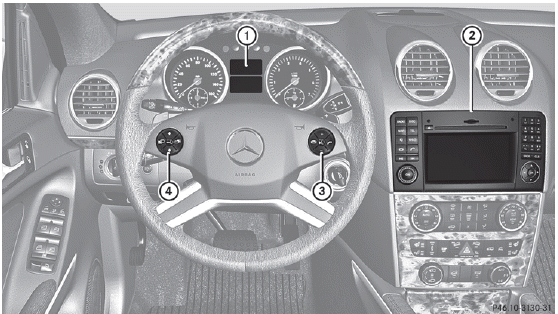
1 Multifunction display
2 COMAND; see the separate
operating instructions
3  Rejects or ends a call
Exits phone book/redial memory
 Makes or accepts a call
Switches to the redial
memory
 Selects submenus in the
Settings menu
Selects submenus in the
Settings menu
Changes values
Adjusts the volume
 Switches on the Voice
Control System; see the separate operating instructions
4  Selects a menu: scrolls back and forth
 Switches off the Voice
Control System; see the separate operating instructions
 Scrolls back and forth within a menu
See also:
Cigarette lighter
WARNING
When leaving the vehicle, always remove the
SmartKey from the ignition lock. Always take
the SmartKey with you and lock the vehicle.
Do not leave children unattended in the
ve ...
Side impact air bags
WARNING
The pressure sensors for side impact air bag
control are located in the doors. Do not modify any components of the doors or
door
trim panels including, for example, the
addit ...
Automatic transmission
Shift the transmission to position P.
The transmission position display in the
multifunction display shows P.
You can also start the engine when the
transmission is in position N. ...