
Installing/removing the cargo compartment cover
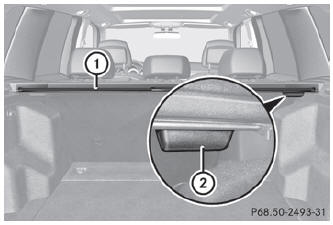
- To remove: make sure that cargo compartment cover 1 is rolled up.
- Press handle 2 on the right underside to the left.
- Remove cargo compartment cover 1.
- To install: attach cargo compartment cover 1 to the opening on the left-hand side.
- Press handle 2 to the right.
- Allow cargo compartment cover 1 to engage in the appropriate recess.
See also:
Changing a wheel
Flat tire
The "Roadside Assistance" section contains information and notes
on how to deal with a flat tire. It also provides
instructions on changing a wheel or mounting
the spare wheel/ ...
Hiding a service message
► Press the R reset button on the
instrument cluster. ...
Vehicle data, GL 450
The data stated here refers specifically to a
vehicle with standard equipment. Consult an
authorized Mercedes-Benz Center for the
data for all vehicle variants and trim levels.
...