
Stowage compartments in the front
Glove box
 Depending on the vehicle's equipment, you will find an AUX IN jack or a Media
Interface installed in the glove box. A Media Interface is a universal interface
for mobile audio equipment, e.g. for an iPod® or USB device (see the separate COMAND
operating instructions).
Depending on the vehicle's equipment, you will find an AUX IN jack or a Media
Interface installed in the glove box. A Media Interface is a universal interface
for mobile audio equipment, e.g. for an iPod® or USB device (see the separate COMAND
operating instructions).
The glove box can be ventilated ().
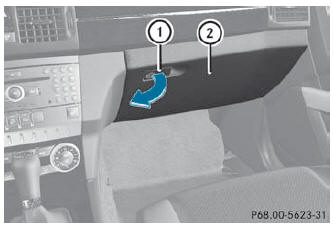
- To open: pull handle 1 and open glove box flap 2.
- To close: fold glove box flap 2 upwards until it engages.
The glove box can only be locked and unlocked using the mechanical key.
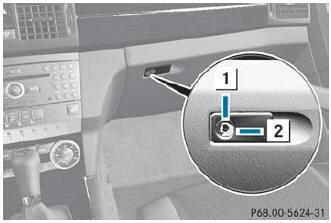
- To lock: insert the mechanical key into the lock and turn it 90° clockwise to position 2.
- To unlock: insert the mechanical key into the lock and turn it 90° counter-clockwise to position 1.
Stowage compartment under the armrest
A small and a large stowage compartment are located under the armrest. The
small stowage compartment can be removed for emptying.
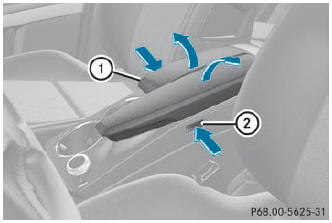
- To open: press left-hand button 2 or righthand button 1. The stowage compartment opens.
See also:
Programming the integrated garage
door opener on the rear-view mirror
Programming
WARNING
Only press the transmitter button on the
integrated garage door opener if there are no
persons or objects present within the sweep
of the garage door. People could otherwi ...
Correct driver's seat position
Observe the safety guidelines on seat
adjustment.
Check whether you have adjusted
seat 3
properly.
Manual and electrical seat adjustment.
Electrical seat adjustment.
When adjusting the se ...
Control panel for dual-zone automatic climate control
Control panel for dual-zone automatic climate control
Canada only
1 To set the temperature, left.
2 To defrost the windshield.
3 To switch the ZONE function on/off.
4 To activate/deactivate coo ...