
Standard display
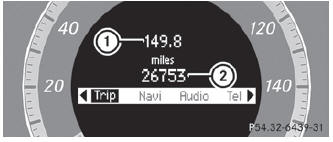
Press and hold the  button on the
steering wheel until the Trip menu with odometer 1 and trip odometer 2 is shown.
button on the
steering wheel until the Trip menu with odometer 1 and trip odometer 2 is shown.
See also:
Cleaning the headliner and carpets
Roof lining: use soft brushes or dry shampoo if it is particularly dirty.
Carpets: use carpet and textile cleaners that have been approved and recommended
by Mercedes-Benz.
...
High-beam headlamps
•► To switch on the high-beam headlamps:
turn the SmartKey in the ignition lock to
position 2 or start the engine.
•► Turn the light switch to
or .
•► Press the combination ...
Folding the cargo compartment floor up
► Press release handle 2 in the direction
of
the arrow.
► Lift cargo compartment floor 1 up by
release handle 2.
► Fold out hook 3 on the underside of the
cargo compartmen ...