
Multifunction display
Values and settings as well as display messages are shown in the multifunction display.
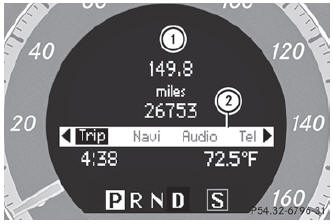
- : Description field
- ; Menu bar
- To show menu bar 2: press the
 or
or
 button on the steering wheel.
See also:
Activating/deactivating Lane Keeping Assist
You can use the Lane Keep. Asst. function
to activate/deactivate Lane Keeping Assist
or Active Lane Keeping Assist.
Press the
or
button on the
steering wheel to select the DriveAssist
me ...
Operating audio player or audio media
Audio data from various audio devices or media can be played, depending on the
equipment installed in the vehicle.
Switch on the audio system or COMAND and select the audio device or medium
( ...
Restarting the tire pressure monitor
WARNING
It is the driver's responsibility to set the tire
pressure to the recommended cold tire
pressure. Underinflated tires affect the ability
to steer or brake the vehicle. You might lose
...