
Cruise control lever
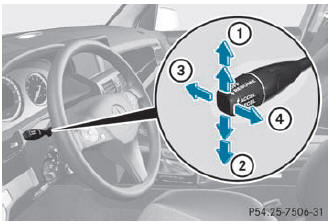
- To switch on or to increase the speed
- To switch on or to reduce the speed
- To deactivate cruise control
- To switch on with the current speed or with the last stored speed
When you activate cruise control, the stored speed is shown in the multifunction display for five seconds. In the multifunction display, the segments between the stored speed and the maximum speed light up.
See also:
Instrument cluster
Displays
Displays
...
Adjusting NECK-PRO luxury head restraints
Adjusting
WARNING
When folding back the side cushions, do not
hold the area between the side cushion and
the cushion holder. There is a danger of
becoming trapped.
You can adjust side bol ...
Driving on sand
WARNING
Do not reduce the tire inflation pressure
before driving through sand. However, if you
do so, remember to correct the tire inflation
pressure before continuing your trip. Drivi ...