
Transmission position and drive program display
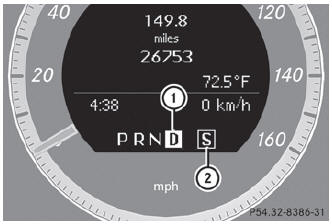
- Transmission position display
- Drive program display
The current position of the selector lever is shown by the indicators next to the selector lever.
The indicators light up when the SmartKey is inserted into the ignition lock. The indicators go out when the SmartKey is removed from the ignition lock.
See also:
Checking the coolant level
Only check the coolant level when the vehicle is on a level surface and the engine
has cooled down.
Turn the SmartKey to position 2 () in the ignition lock. On
vehicles with KEYLESS-GO, press ...
Driving
My biggest issue was with the E350's stiff accelerator pedal. I did most of
my driving on icy roads, and that's not where you want to be abrupt with the gas
pedal. Thing is, the pedal was so stiff ...
Trip computer "From start" or "From
reset"
The values in the From Start submenu are
calculated from the start of a journey, while
the values in the From Reset submenu are
calculated from the last time the submenu
was reset.
– Press th ...