
Operation
Depending on the date of manufacture of your vehicle, the
 or
or
 symbol for the automatic headlamp mode/daytime
running lamps is located on the light switch.
symbol for the automatic headlamp mode/daytime
running lamps is located on the light switch.
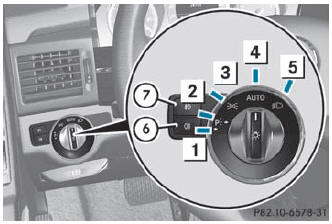
Illustration: light switch with the
symbol for the automatic headlamp mode/daytime
running lamps
 Left-hand standing lamps
 Right-hand standing lamps
 Parking lamps, license plate and
instrument cluster lighting
Parking lamps, license plate and
instrument cluster lighting
 Automatic headlamp mode/daytime
running lamps
Automatic headlamp mode/daytime
running lamps
 Low-beam/high-beam headlamps
 Rear fog lamp
 Front fog lamps
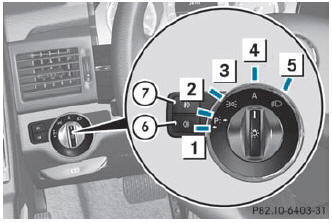
Illustration: light switch with the
 symbol for the automatic headlamp mode/daytime
running lamps
symbol for the automatic headlamp mode/daytime
running lamps
Left-hand standing lamps
Right-hand standing lamps
Parking lamps, license plate and
instrument cluster lighting
 Automatic headlamp mode/daytime
running lamps
Automatic headlamp mode/daytime
running lamps
Low-beam/high-beam headlamps
Rear fog lamp
Front fog lamps
The turn signals, high-beam headlamps and the high-beam flasher are operated using the combination switch ().
 Switch off the parking lamps and standing lamps when you leave the vehicle.
This prevents the battery from discharging.
Switch off the parking lamps and standing lamps when you leave the vehicle.
This prevents the battery from discharging.
The exterior lighting (except the parking/ standing lamps) switches off automatically if you:
- remove the SmartKey from the ignition lock
- open the driver's door with the SmartKey in position 0
If you hear a warning tone when you leave the vehicle, the lights may still be switched on.
Turn the light switch to or
.
See also:
COMAND APS standard on G 500
All G 500 model versions feature the COMAND APS infotainment system with a
built-in six-disc DVD changer. The system's specification includes hard-disc
navigation with a tracking function outside ...
Activation conditions
You can activate the HOLD function if:
Rthe vehicle is stationary.
Rthe engine is running.
Rthe driver's door is closed or if your seat belt is fastened.
Rthe electric parking brake is released.
...
Off-road ESP®
An ESP® system specifically suited to off-road
terrain is activated automatically if the offroad
drive program is activatedor if the LOW RANGE off-road gear is selected. It
intervenes with a delay ...