
Instruction labels for tires and loads
WARNING
Do not overload the tires by exceeding the
specified load limit as indicated on the Tire
and Loading Information placard on the
driver's door B-pillar. Overloading the tires
can overheat them, possibly causing a
blowout. Overloading the tires can also result
in handling or steering problems, or brake
failure.
Two instruction labels on your vehicle show the maximum possible load.
(1) The Tire and Loading Information placard on the B-pillar on the driver's side. The Tire and Loading Information placard shows the maximum permissible number of occupants and the maximum permissible vehicle load. It also contains details of the tire sizes and corresponding pressures for tires mounted at the factory.
(2) The vehicle identification plate is on the B-pillar on the driver's side. The vehicle identification plate informs you of the gross vehicle weight rating. It is made up of the vehicle weight, all vehicle occupants, the fuel and the cargo. You can also find information about the maximum gross axle weight rating on the front and rear axle.
The maximum gross axle weight rating is the maximum weight that can be carried by one axle (front or rear axle). Never exceed the maximum load or the maximum gross axle weight rating for the front or rear axle.
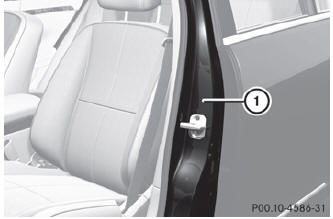
1 B-pillar, driver's side
See also:
Adding DEF
WARNING
Make sure
• DEF does not come into contact with skin, eyes, or clothing
• to keep DEF out of the reach of children If you and/or others have come into
contact with DEF:
• If DEF ...
Navigation system menu
Displaying navigation instructions
In the Navigation menu: the instructions
from the navigation system appear in the
multifunction display. For more information,
see the separate operating instruc ...
Deactivating/activating PARKTRONIC
1 To deactivate/activate PARKTRONIC
2 Indicator lamp
If indicator lamp 2 lights up, PARKTRONIC is
deactivated.
PARKTRONIC is automatically activated
when you turn the SmartKey to position ...