
Fuse box on the left in the direction of travel
 Open the hood.
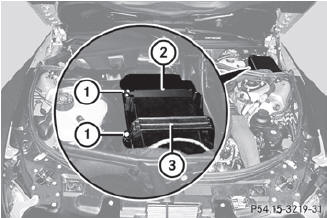
Remove any existing moisture from the
fuse box using a dry cloth.
AMG vehicles: remove the control unit
above the fuse box.
To open: undo screws 1 with an Allen
key.
Remove bracket 3.
Remove cover 2.
To close: check whether the rubber seal is
lying correctly in cover 2.
Put cover 2 back in position.
Replace bracket 3.
Tighten screws 1 using an Allen key.
 The cover must be seated properly,
otherwise moisture or dirt could impair the
function of the fuses.
The cover must be seated properly,
otherwise moisture or dirt could impair the
function of the fuses.
Close the hood.
See also:
Important safety notes
WARNING
For reasons of safety, have the NECK-PRO
head restraints/NECK-PRO luxury head
restraints checked at an authorized
Mercedes-Benz Center after a rear-end
collision.
WARNING
When p ...
External authorization
If COMAND does not detect your mobile
phone, this may be due to particular security
settings on your mobile phone. In this case,
you can test if your mobile phone can find
COMAND. The Bluetoot ...
Activating/deactivating Bluetooth®
Select Vehicle in the main function bar by
turning the COMAND controller and
press to confirm.
Select System by turning
the
COMAND controller and press to
confirm.
Select Blueto ...