
Checking the coolant level
Only check the coolant level when the vehicle is on a level surface and the engine has cooled down.
 Turn the SmartKey to position
2 in the ignition lock.
Turn the SmartKey to position
2 in the ignition lock.
On vehicles with KEYLESS-GO, press the Start/Stop button twice.
Check the coolant temperature display in
the instrument cluster.
The coolant temperature must be below 158 °F (70 °C).
WARNING
In order to avoid any potentially serious burns:
• use extreme caution when opening the
hood if there are any signs of steam or
coolant leaking from the cooling system, or
if the coolant temperature display indicates
that the coolant is overheated.
• do not remove the pressure cap on the
coolant reservoir if the coolant temperature
is above 158 °F (70 °C). Allow the engine to
cool down before removing the cap. The
coolant reservoir contains hot fluid and is
under pressure.
• using a rag, slowly turn the cap
approximately 1/2 turn to relieve excess
pressure. If opened immediately, scalding
hot fluid and steam will be blown out under
pressure.
• do not spill antifreeze on hot engine parts.
Antifreeze contains ethylene glycol which
may burn if it comes into contact with hot
engine parts.
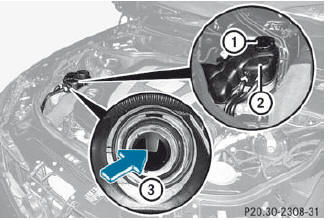
Slowly turn cap 1 half a turn counterclockwise
and allow excess pressure to
escape.
Turn cap 1 further counter-clockwise and
remove it.
If the coolant is at the level of marker bar 3 in the filler neck when cold, there is enough coolant in coolant expansion tank 2.
If the coolant is approximately 0.6 in (1.5 cm) above marker bar 3 in the filler neck when warm, there is enough coolant in coolant expansion tank 2.
If necessary, add coolant that has been
tested and approved by Mercedes-Benz.
Replace cap 1 and turn it clockwise as far
as it will go.
For further information on coolant.
See also:
Message memory
The on-board computer saves certain display messages. You can call up the
display messages
in the message memory.
•► Press the button on the steering
wheel to select the Serv. menu.
If ...
Calling up a stored parking position setting
Turn the SmartKey to position 2 in the ignition lock.
Adjust the exterior mirror on the frontpassenger side with the corresponding
button ().
Engage reverse gear. The exterior mirror on the ...
Playback options
The following options are available to you:
• Normal Track Sequence
The tracks are played in the normal order
(e.g. track 1, 2, 3, etc.).
In MP3 mode, the track order is determined
by the ord ...