
Route guidance active
No change of direction announced
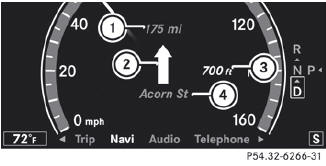
1 Distance to the destination
2 Symbol for "follow the road's course"
3 Distance to the next change of direction
4 Current road
Change of direction announced without a lane recommendation
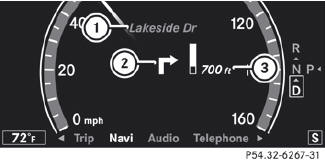
1 Road into which the change of direction leads
2 Symbol for change of direction
3 Distance to change of direction and visual distance display
When a change of direction has been announced, you will see visual distance display 3 next to the symbol for the change of direction 2. This decreases in size as you approach the announced change of direction.
Change of direction announced with a lane recommendation
Lane recommendations are only displayed if the relevant data is available on the digital map.
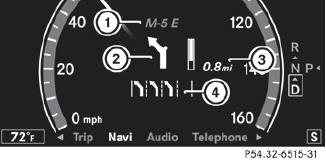
1 Road into which the change of direction leads
2 Symbol for change of direction
3 Distance to change of direction and visual distance display
4 Lane recommendation
On multiple-lane roads, COMAND can provide lane recommendation 4 for the next change of direction. Lanes may be added during a change of direction.
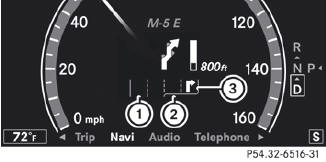
1 Uninterrupted lane
2 New lane during a change of direction
3 Lane recommended for the change of direction
See also:
Resetting to factory settings
For safety reasons, the Day Lights function
in the Lights submenu is only reset when the
vehicle is stationary.
•► Press the button on the
steering wheel to select the Settings
menu.
...
Premium-grade unleaded gasoline
To ensure the longevity and full
performance of the engine, only premiumgrade
unleaded gasoline may be used.
If there is no premium-grade unleaded
gasoline available and regular-grade
unle ...
Before changing a fuse
Park the vehicle and apply the parking
brake.
Switch off all electrical consumers.
Remove the SmartKey from the ignition
lock.
The fuses are located in various fuse boxes:
...