
Operating the on-board computer
The on-board computer is activated as soon as you turn the SmartKey to position 2 in the ignition lock.
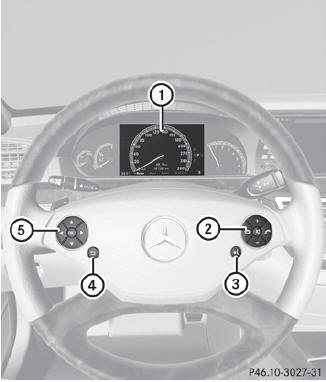
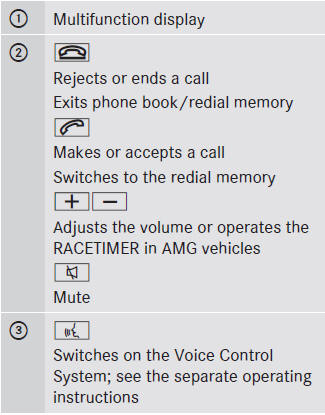
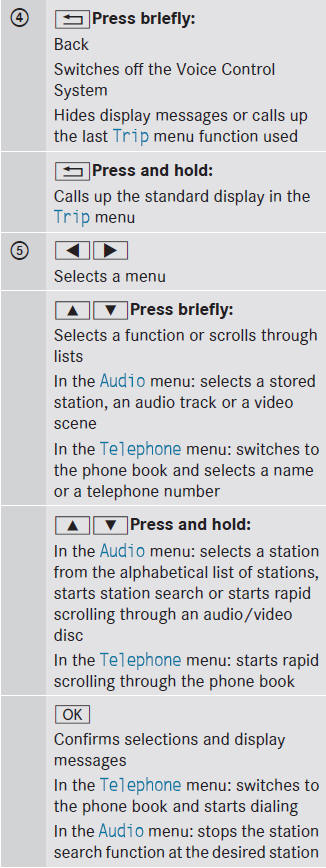
You can control the multifunction display and the settings in the on-board computer using the buttons on the multifunction steering wheel.
See also:
Driving safety systems overview
In this section, you will find information about the following driving safety
systems:
• ABS (Anti-lock Braking System)
• BAS (Brake Assist System)
• BAS PLUS (Brake Assist System Plus*)
...
Locking the vehicle (mechanical key)
If the vehicle can no longer be locked with the SmartKey, use the mechanical
key.
Open the driver's door.
Close the front-passenger door, the rear doors and the tailgate.
Press the locki ...
Floormat on the driver's side
WARNING
Whenever you are using a floormat, make sure there is enough clearance and that
the floormat is securely fastened.
The floormat should always be securely fastened using the fastening ...