
Lane Keeping Assist
Important safety notes
Lane Keeping Assist monitors the area in front of your vehicle by means of a camera at the top of the windshield. Lane Keeping Assist detects lane markings on the road and warns you before you leave your lane unintentionally.
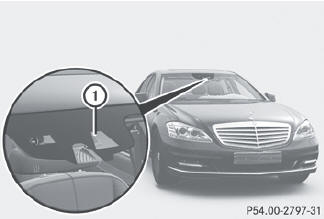
1 Lane Keeping Assist camera
If you have chosen the Display Unit Speed-/Odometer function in the on-board computer and select km as the unit of measurement, Active Lane Keeping Assist is active from speeds of 60 km/h. If the mph display unit is selected, the assistance range begins at 40 mph.
WARNING
Lane Keeping Assist does not keep your
vehicle in its lane. It is only an aid and may
detect the lane markings on the road
incorrectly or not at all.
The system may be impaired or may not
function if:
• there is poor visibility, e.g. due to
insufficient illumination of the road, or due
to snow, rain, fog or spray.
• there is glare, e.g. from oncoming traffic,
the sun, or reflection from other vehicles.
• the windshield is dirty, fogged up or
covered, for instance by a sticker, in the
vicinity of the camera.
• several or no lane markings for a single lane
are present.
• the lane markings are worn away, dark or
covered up, e.g. by dirt or snow.
• the distance to the vehicle in front is too
small and the lane markings thus cannot be
detected.
• the lane markings on the road are unclear,
e.g. near roadworks.
• the lane markings change quickly, e.g.
lanes branch off, cross one another or
merge.
• the road is narrow and winding.
Lane Keeping Assist cannot detect road and
traffic conditions. It is not a substitute for
attentive driving. You are responsible for the
vehicle's speed, braking in good time, and
steering correctly. Always adapt your driving
style to suit the prevailing road and weather
conditions. Always pay attention to traffic
conditions and your surroundings. Otherwise,
you may fail to recognize dangers in time,
cause an accident and injure yourself and
others.
A warning can be given when a front wheel passes over a lane marking. It will warn you by means of intermittent vibration in the steering wheel for up to 1.5 seconds.
In order that you are warned only when necessary and in good time if you cross the lane marking, the system recognizes certain conditions and warns you accordingly.
The warning vibration occurs earlier if:
• you approach the outer lane marking on a
bend.
• the road has very wide lanes, e.g. a
freeway.
• the system recognizes solid lane markings.
The warning vibration occurs later if:
• the road has narrow lanes.
• you cut the corner on a bend.
No warning vibration occurs if:
• you clearly and actively steer, brake or
accelerate.
• you cut the corner on a sharp bend.
• a driving safety system intervenes, e.g. ABS, BAS or ESP®.
• you switch on the turn signals. In this event,
the warnings are suppressed for a certain
period of time.
Switching on Lane Keeping Assist
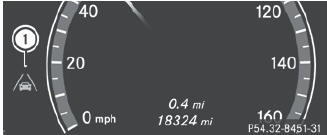
 Activate Lane Keeping Assist using the onboard
computer.
Activate Lane Keeping Assist using the onboard
computer.
Symbol 1 appears in the multifunction display.
If your speed exceeds 40 mph (60 km/h) and lane markings are detected, symbol 1 is shown in green. Lane Keeping Assist is ready for use.
See also:
General notes
USA only:
This device complies with Part 15 of the
FCC Rules. Operation is subject to the
following two conditions:
1. This device may not cause harmful
interference, and
2. this device must ...
Towing the vehicle with the rear axle raised
Only possible on vehicles without 4MATIC.
When towing your vehicle with the rear axle raised, it is important that you
observe the safety instructions ().
The ignition must be switched off if y ...
Winter driving
Important safety notes
WARNING
If the vehicle becomes trapped in snow,
ensure that snow is kept away from the
exhaust pipe and from around the vehicle as
long as the engine is running ...