
Active multicontour seat
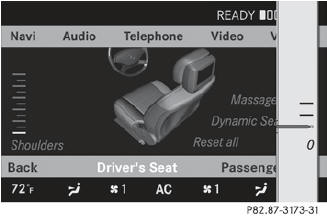
The dynamic function of the active multicontour seat automatically adapts the side bolsters of the backrest to your current driving style.
 Select the seat.
Select Dynamic Seat by sliding
 or
turning
or
turning  the COMAND controller and
press
the COMAND controller and
press  to confirm.
To confirm your selection: press
.
A scale appears.
You can select:
• 0: Off
• 1: Level 1
• 2: Level 2
Select Setting by sliding
 or turning
the COMAND controller and press
to confirm.
or turning
the COMAND controller and press
to confirm.
Massage function (PULSE)
The massage function helps you to prevent muscle tension on long journeys.
Select the seat.
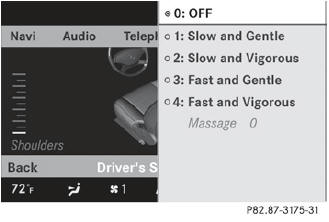
Select Massage by sliding or
turning
the COMAND controller and press
to confirm.
A list appears.
You can select different types of massage
function:
• 0: OFF
• 1: Slow and Gentle
• 2: Slow and Vigorous
• 3: Fast and Gentle
• 4: Fast and Vigorous
To confirm your selection: press
.
Select Setting by sliding
or turning
the COMAND controller and press
to confirm.
The massage function runs for approximately 6 to 20 minutes, depending on the setting.
See also:
Activating
- To open the tailgate: pull the handle on
the tailgate.
- To stop the opening procedure at the
desired position: press the closing button
in the tailgate or pull the handle
on the outside of ...
Information for customers in California
Under California law you may be entitled to a
replacement of your vehicle or a refund of the
purchase price or lease price, if after a
reasonable number of repair attempts
Mercedes-Benz USA, L ...
Kilopascal (kPa)
Metric unit for tire pressure. 6.9 kPa is the
equivalent of 1 psi. Another unit for tire
pressure is bar. There are 100 kilopascals
(kPa) to 1 bar. ...