
Switching to MUSIC REGISTER
 Select Audio in the main function bar by
sliding
Select Audio in the main function bar by
sliding  and turning
 the COMAND
controller and press
the COMAND
controller and press  to confirm.
If MUSIC REGISTER was the last mode selected, it is now switched on.
If another audio source is switched on, you can now switch on the MUSIC REGISTER in the audio menu.
Select Music Register and press
to
confirm.
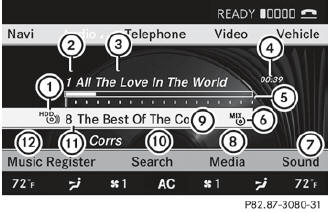
Example display: MUSIC REGISTER
1 Type of data carrier: MUSIC REGISTER
2 Track number
3 Track name
4 Track time
5 Graphic time and track display
6 Current playback settings (no symbol for "Normal track sequence")
7 Sound settings
8 Media selection
9 Current folder
10 Search functions
11 Data carrier position in the media list
12 To call up the MUSIC REGISTER menu
See also:
Cleaning Night View Assist Plus
Never clean the camera lens. When
cleaning the field of vision of the driving
systems, make sure that you do not spray
glass cleaner on the camera lens. If the
camera lens is dirty, visit ...
Making adjustments in 1 mph (Canada: 1 km/h) increments
•► Briefly press the cruise control lever to the pressure point, up 1 for a higher speed or down 2 for a lower speed.
The last speed stored is increased or reduced. ...
Unlocking and opening doors from the inside
Only open the door when the traffic situation permits.
If the vehicle was previously locked with the SmartKey or with KEYLESS-GO, opening
the vehicle from the inside will activate the antitheft ala ...